
How-to
How to build a babysitter information sheet people actually use
A babysitter information sheet works only if it's easy to update and reaches the sitter right when they need it, not just when you remember to print a new one. Cover the essentials — emergency contacts, allergies, medications, bedtime routine, house rules, and pickup or arrival windows — but keep the source living rather than printed, so a change of plans updates the version the sitter actually sees instead of leaving a stale sheet on the fridge.
Key takeaway: The content matters less than whether it's still accurate the day it's used.
What belongs on a babysitter info sheet (the essentials)
Most templates converge on the same core sections, whichever format you use:
- Emergency contacts (both parents, one nearby backup adult, paediatrician, poison control)
- Allergies and medications, with dosage and timing if any are scheduled
- Bedtime and meal routine, including anything a child insists on
- House rules (screen time, who's allowed in, what's off-limits)
- Arrival and pickup time window, and what to do if plans run late
- Address and any access details (door code, where a spare key is)
Why printable templates go stale
Search results in this space are dominated by free printable templates — titles like "Free Printable Babysitter's Information Guide," "Babysitting Checklist (Free Printable)," and "The Ultimate Grandparents' Emergency Babysitting Checklist" appear constantly. The appeal is obvious: a fill-in-the-blank sheet is fast to make once. The problem is what happens after: a phone number changes, a new allergy gets diagnosed, bedtime moves twenty minutes later, and the printed sheet on the fridge quietly stops being accurate. Nobody re-prints it until something goes wrong and someone notices the sheet was out of date.
Making it something the sitter can actually check mid-visit
A living version solves the staleness problem, but only if it's also easy for the sitter to reach in the moment — most sitters won't want to dig through a parent's personal apps mid-visit. The practical shape that works: a shareable note or link a sitter can open without creating an account, kept in one place you update directly rather than retype, and specific enough that a first-time sitter and a regular one both find what they need without a phone call. If updating the sheet takes more effort than sending a text, it will drift out of date the same way the printed version did.
Care coverage without a 30-text group chat
The information sheet solves "what does the sitter need to know." A separate, related problem is "who's covering this, and when" — coordinating the actual booking, especially across grandparents, a regular sitter, and the occasional favour from a friend. That's usually where a group chat breaks down: a request goes out, replies come back out of order, and it's unclear who actually confirmed. Keeping the coverage request (who, what window, confirmed by whom) separate from the informal chat is worth doing regardless of which app or paper system you use for the information sheet itself.
How Kinrows helps
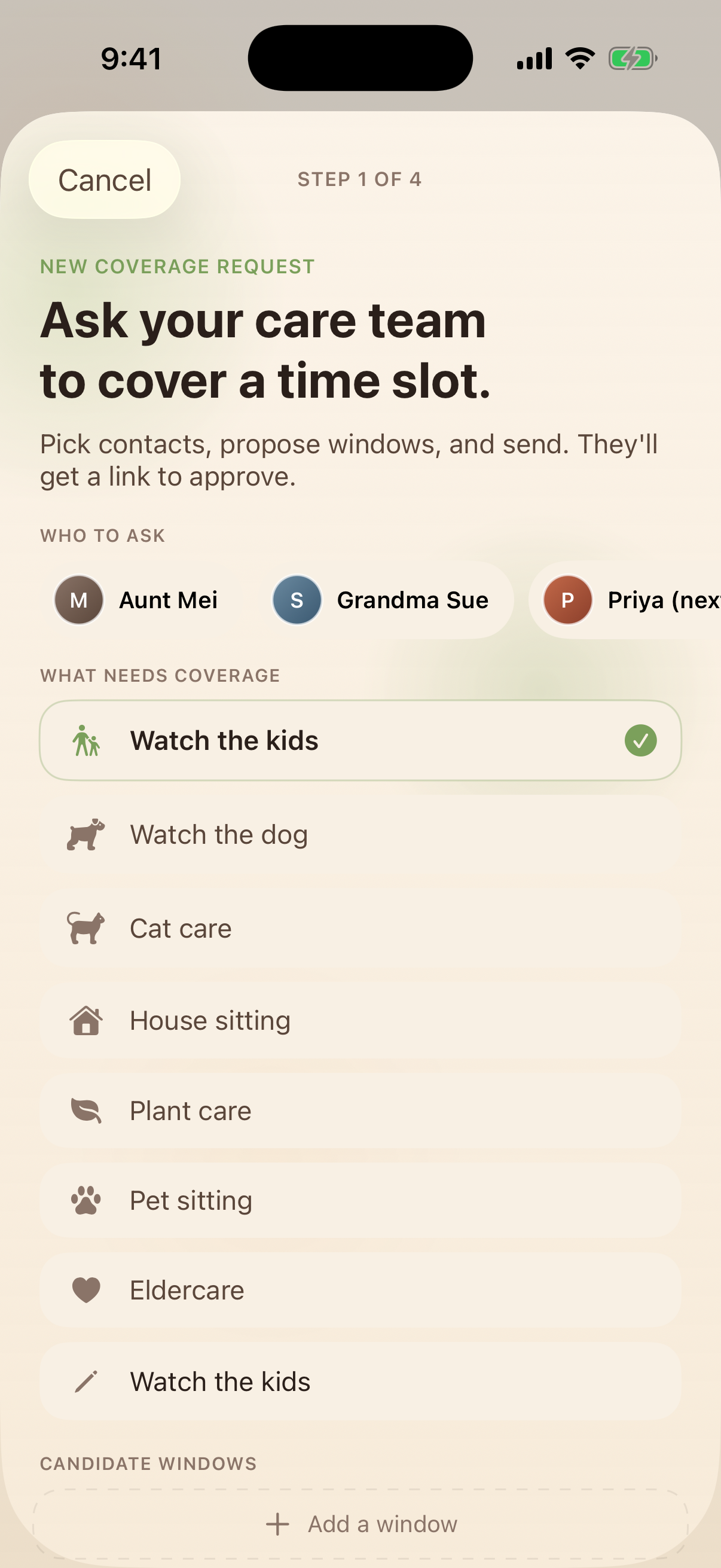
Kinrows lets you keep a shareable, always-current note with everything a sitter needs, plus each child's profile for context a first-time helper might not otherwise have. For the coordination side, Care coverage lets you ask your care team for babysitting, pet, or house coverage with a proposed time window; a helper approves it via a share link with no app install required, or in-app if they already have Kinrows, and an approved window lands on both calendars. This organizes the logistics — who's covering, when, and what they need to know — it isn't a substitute for a human backup plan in a genuine emergency.
Frequently asked questions
What information should I leave for a babysitter?
At minimum: emergency contacts (parents, a nearby backup adult, the paediatrician), any allergies or medications with dosing details, the bedtime and meal routine, house rules, and your expected pickup time. Add the address and any entry details if it's a new sitter's first visit to your home.
What should be on a babysitter emergency sheet?
The emergency-specific core is contact numbers (parents, backup adult, paediatrician, poison control), any medical conditions or allergies, current medications and dosages, and the nearest hospital or urgent care if you're travelling somewhere unfamiliar. Keep this section separate and clearly labelled so it's fast to find under pressure.
Does a babysitter need to download an app to see this?
It shouldn't have to. Whatever system you use, favour a format the sitter can open from a shared link or a simple text, rather than requiring an account or app install just to read the information sheet or confirm a coverage window.
How do grandparents fit into this differently than a paid sitter?
Grandparents usually need less of the emergency-contact basics, since they already know the family, but benefit from the same living, current version of routines and house rules — especially if visits are infrequent enough that details (a new allergy, a changed bedtime) have shifted since their last visit.