
Compare
Kinrows vs AnyList
AnyList is a mature, single-purpose shared grocery list and recipe manager, free with a paid Complete tier ($9.99/year individual or $14.99/year household) that adds recipe import, meal planning and Mac/web apps. Kinrows' Lists and Cook features cover shared grocery lists and pantry-aware recipe ideas as part of a wider, free household system that also includes a calendar, budget, chores and more, launching on iPhone in September 2026. Choose AnyList if grocery lists and recipe import are the whole job; choose Kinrows if you want that connected to the rest of household life.
Key takeaway: AnyList is the mature single-purpose shared grocery list; Kinrows' Lists and Cook cover the same ground inside a wider free household system.
What each app actually is (single-purpose vs. whole-household)
AnyList is a long-running shared shopping list and recipe manager: instant list sync between household members, recipe import from websites, and meal planning. It's free, with a paid Complete tier at $9.99 a year for one person or $14.99 a year for a household, adding recipe import, a meal-planning calendar, Mac and web apps, Apple Watch support, recipe scaling and item photos (anylist.com/complete). It has no calendar, budget, pantry, chores or family-chat features — it does one job.
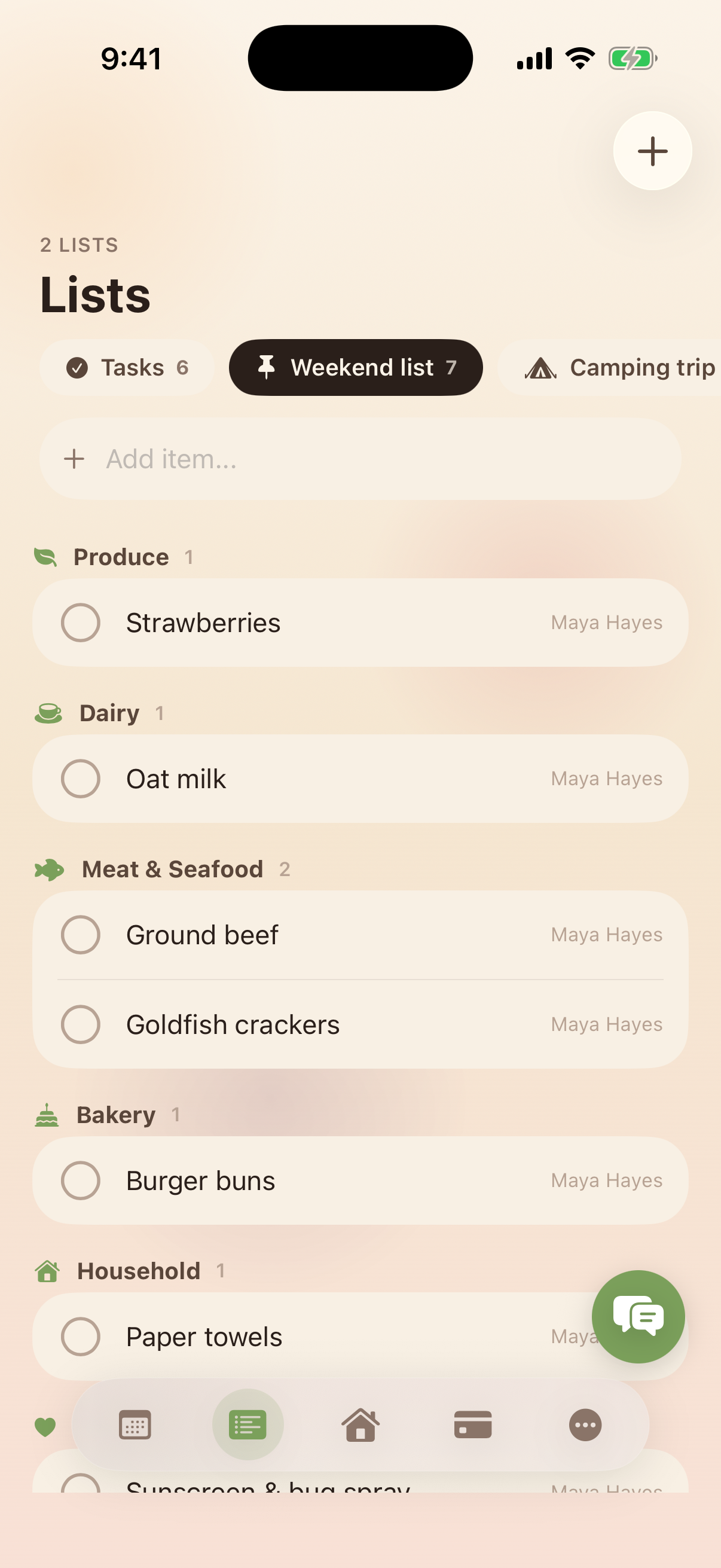
Kinrows' Lists feature covers the same core need — unlimited named lists, grocery-style check-off, automatic grocery categorization, drag-to-reorder — as part of a household system that also includes a shared calendar, budget, pantry, trips, family polls, chores and allowance, and an optional AI Concierge. Cook generates recipe ideas from what's actually in your pantry rather than importing recipes from the web, a different mechanism from AnyList's recipe import. Kinrows is iPhone-only, free at the core, and launches September 2026.
AnyList's genuine strengths, and where it frustrates people
AnyList's core strength is maturity: real-time list sync is the entire point of the app, and it's widely recommended as the shared grocery list to use. When it works, it works well for exactly this one job.
The recurring 2026 complaint is that the core promise — sync — periodically breaks: “We've used this app for a long time but are growing frustrated with syncing issues that have arisen during the past few months. Despite all kinds of troubleshooting, our grocery list won't sync like it used to. This results in duplicate purchases and wasted money: Purchased items are crossed off the list on one phone but still appear as unpurchased on the other. AnyList, please fix this!” (an App Store reviewer, 2 stars, “Syncing not reliable,” App Store US, 2026-07-25). Another reviewer described a shared list flickering and disappearing entirely mid-edit (an App Store reviewer, 1 star, “This app has a major glitch!,” App Store US, 2026-08-22). A separate group of reviewers is frustrated that AnyList lost its Alexa voice-assistant integration and iOS lock-screen widget: “Not blaming AnyList but it has become useless in my house which is totally Alexa ecosystem and on my devices which are all Apple. My number one reason for having it was for the ease of asking out loud for items to be added to a list… Hate to rate it this low but it is useless.” (an App Store reviewer, 1 star, “Incompatibility Problem,” App Store US, 2026-08-15).
Choose AnyList if…
- A shared grocery list and recipe import are the whole job you need done, and you don't want a calendar, budget or chores bundled in.
- You rely on the Mac and web apps, Apple Watch support or recipe scaling that AnyList's Complete tier adds — Kinrows doesn't match AnyList's recipe-import maturity, and has no Alexa or voice-assistant integration at all.
- You're on Android, since Kinrows is iPhone-only.
Choose Kinrows if…
- You want the shared grocery list connected to the calendar, budget and chores it actually affects — a receipt logged in Budget, a recipe that pulls from your real pantry, a task moved by asking the Concierge.
- You want recipe ideas generated from what's already in your kitchen rather than imported from an external site — a different approach from AnyList's recipe import, not a replacement for it if importing from the web is what you rely on.
- You want list-sync reliability without AnyList's reported duplicate-purchase issues — though this is Kinrows' stated design, not yet proven at scale, since it hasn't launched.
- You're an iPhone household who can wait for September 2026.
Kinrows vs AnyList at a glance
| Kinrows | AnyList | |
|---|---|---|
| Price for the whole household | Free core app (incl. Lists & Cook); Concierge add-on $4.99–$9.99/mo | Free; Complete $9.99/yr individual or $14.99/yr household (anylist.com) |
| Ads | — | no ad complaints found in reviews |
| Android app | — | yes, plus Mac and web apps |
| Two-way sync with your phone's calendar | Yes | no calendar feature at all |
| Shared lists | Yes | yes, real-time sync — but reviewers report it breaking periodically |
| Chores / allowance tracking | yes, fixed weekly allowance, non-punitive | — |
| Meal planning / pantry | yes, pantry-aware recipe ideas from real inventory | recipe import and meal planning (Complete tier); no pantry inventory |
| AI assistant that takes actions | yes, Concierge (paid add-on) | no — ChatGPT recipe import is a one-way feature, reported broken |
| Data used to train AI | — | not stated |
| Hardware required | — | — |
| Maturity / launch status | pre-launch, opens September 2026 | established, live today |
A grocery list built to survive a spotty connection
AnyList's most common 2026 complaint is a shared list breaking sync — items crossed off on one phone still showing as unpurchased on another. Kinrows' Lists live inside the same household-scoped, server-validated data as everything else in the app: unlimited named lists, grocery-style check-off or plain, items automatically categorized, and lists pinnable to the Home dashboard. It's not a guarantee against every possible sync issue, but it's built on the same backend as the calendar and budget it needs to stay consistent with, not bolted on separately.
Frequently asked questions
Is AnyList or Kinrows better for a shared grocery list?
AnyList is purpose-built for this and has a mature, widely used real-time sync feature — when it works. Some 2026 reviewers report it breaking, causing duplicate purchases. Kinrows' Lists cover the same ground, shared and auto-categorized grocery lists, as one part of a wider household app, but it hasn't launched yet, so there's no track record to weigh against AnyList's years of use.
Does Kinrows import recipes like AnyList?
No — that's a genuinely different feature. AnyList imports recipes from websites you find; Kinrows' Cook suggests recipes based on what's actually in your pantry and sends missing ingredients to the grocery list. If importing recipes from the web is what you need, AnyList's recipe import remains the more mature tool for that specific job.
Why isn't my AnyList shopping list syncing?
Several 2026 App Store reviewers report the same issue: items checked off on one phone still appear unpurchased on another, sometimes causing a shared list to flicker and disappear mid-edit. AnyList hasn't published a public explanation for this in the sources reviewed here, and reviewers describe troubleshooting without success. If sync reliability is the deciding factor for your household, check AnyList's current support pages before relying on it for daily shopping.