
Alternatives
Best Skylight Calendar Alternatives (2026)
People search for a Skylight alternative after weighing hardware cost against what it actually unlocks: Skylight's wall display runs $170 to $630, and several genuinely useful extras, including meal planning and chore rewards, sit behind an optional roughly $79-a-year subscription on top of that. The always-on display itself is a real, cited strength that a phone app cannot fully replicate. For most households, though, the shared-planning function underneath it — a calendar, lists, and chores everyone can see — runs just as well on the phones already in the house. Kinrows is one hardware-free alternative, though it is iPhone-only and launches September 2026.
Key takeaway: Skylight's ambient display is a genuine strength; its subscription-gated extras on top of paid hardware are the recurring complaint.
Why people search for a Skylight alternative
Skylight is a physical wall-mounted or countertop touchscreen calendar (10″, 15″, and 27″ "Max" models, $170–$630) that syncs Google, iCloud, Outlook, and Yahoo calendars alongside chores, meal planning, and photo display. The recurring complaint is that the subscription feels like a second toll on hardware already paid for: "The subscription model just to put photos on a photo frame is absolutely disgusting... They use AI chat bot as customer service. This whole scam of a company is a joke" — an App Store reviewer, 1★, "Cash Grab," App Store US, 2026-09-05. Another wrote: "Love the calendar itself but trying to manage it via the app is very frustrating... Don't see the value of paying for an annual subscription for such an inferior implementation" — an App Store reviewer, 2★, "Great concept, terrible app.," App Store US, 2026-08-31.
The companion app itself draws separate complaints about bugs: one reviewer described duplicate items appearing on screen, scheduling bugs, and a laggy interface — an App Store reviewer, 3★, "Glitchy and not intuitive," App Store US, 2026-09-04.
What Skylight does well (the always-on display is real)
The core idea genuinely works for a lot of households: a shared screen on the wall that everyone can glance at without unlocking a phone. Third-party reviews describe it consistently praising the device for centralizing multiple kids' schedules and displaying family photos, and several App Store reviewers who complain about the app still say the calendar hardware itself is good — "Love the calendar itself" (an App Store reviewer). For a family with several kids and a shared wall or countertop space, that ambient visibility is a real advantage a phone app cannot fully replicate.
Ranked alternatives
Because the core Skylight complaint is a subscription layered on top of already-paid hardware, this ranking weighs, in order: whether the alternative requires any hardware purchase at all, whether its paid tier (if any) gates basic functions or only extras, and how broad its free feature set is beyond a calendar.
- Cozi. No hardware, a decade-plus track record, and a free shared calendar and lists, though the free tier now caps the calendar view at 30 days and shows ads unless you pay for Gold.
- FamilyWall. No hardware, and broader than a calendar — tasks, photos, location, finance — but its own reviewers report frequent crashes after updates and a subscription requirement to add family members.
- TimeTree. No hardware, free with ads, simple per-event chat; a concentrated group of its reviewers are currently leaving over AI features reportedly trained on calendar data regardless of opt-out.
- Hearth Display. Another physical wall display, around $700 in hardware plus roughly $84 a year to keep basic functions like to-dos working — several of its own reviewers describe it becoming, in their words, "the most expensive picture frame" once the subscription lapses, so it does not solve Skylight's core complaint either.
- Kinrows. A free-core, phone-first household organizer — calendar, lists, chores, budget and more — with no hardware to buy; the optional Concierge AI is a separate paid layer, not a second toll on features you already own. It is iPhone-only and launches September 2026, and it cannot replicate an always-visible wall screen for households that specifically want one.
Who should stick with Skylight
If your household has already bought the hardware and the always-on display is doing its job — kids checking their own schedule without asking, family photos cycling where everyone sees them — that ambient visibility is genuinely hard for a phone app to replace, since it requires no one to open anything. Households that specifically want a shared screen visible without picking up a phone, or that manage several kids' schedules and value having them centralized on the wall, are the clearest fit for Skylight; the subscription-vs-hardware complaint is real but doesn't erase that core value for the households it suits.
Skylight vs. four alternatives
| Skylight Calendar | Cozi | FamilyWall | TimeTree | Hearth Display | Kinrows | |
|---|---|---|---|---|---|---|
| Requires buying hardware | yes ($170–$630) | — | — | — | yes (~$700) | — |
| Basic functions require an ongoing subscription | meal planning/chore rewards only | no (ads on free tier instead) | yes — per reviewers, to add members | no (ads on free tier instead) | yes — per reviewers, to dos included | — |
| Always-on shared display without picking up a phone | Yes | — | — | — | Yes | — |
| Covers chores and budget beyond the calendar | chores yes, budget no | — | yes, broad | — | chores yes, budget no | Yes |
| Platform | hardware plus iOS/Android app | iOS, Android, web | iOS and Android | iOS and Android | hardware plus iOS/Android app | iPhone only (iOS 18+) |
| Price for the whole household | hardware $170–$630 + optional ~$79/yr | free core; Gold $39 per cozi.com (period not stated) | freemium, ~$5/mo per third-party sources | free, ads; paid ad removal | hardware ~$700 + ~$84/yr | free core; optional Concierge $4.99–$9.99/mo |
The shared-planning function without the hardware
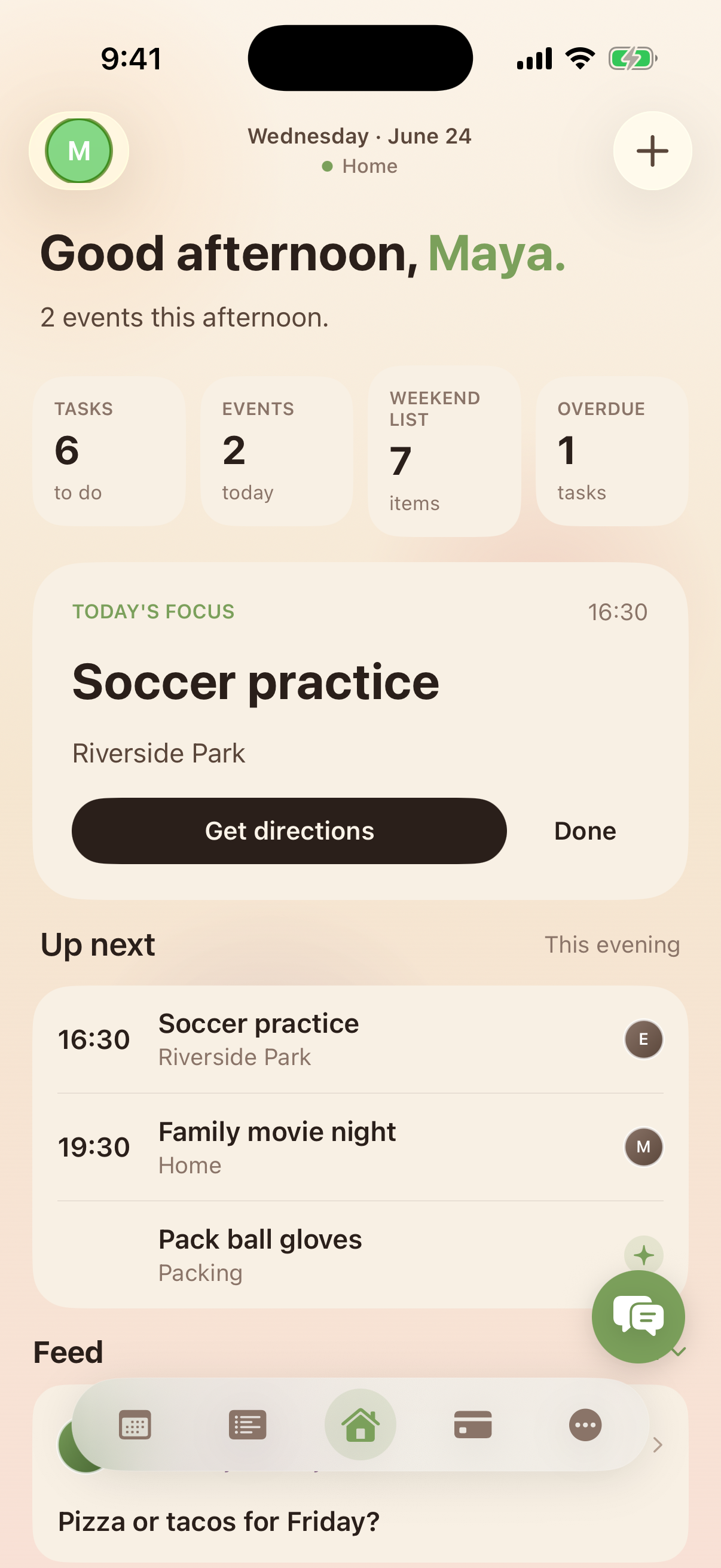
What a wall display actually promises — one calendar, one set of lists, one chore board the whole household can see — is the same job Kinrows' free core app does on the phones already in the house. The home screen shown here brings the family feed, an "up next" strip with one-tap task check-off, and household stats into one place, with no display to mount and no upfront hardware cost. It does not replace an always-visible wall screen for a household that specifically wants ambient visibility without anyone picking up a phone — that is a genuine tradeoff, stated plainly, not something a phone app fully closes.
Frequently asked questions
Is Skylight Calendar worth it?
Skylight's hardware ($170–$630) buys an always-on shared display that reviewers credit with making family planning calmer just by being visible. Some of its most useful extras, including meal planning and chore rewards, sit behind an optional roughly $79-a-year subscription, and the companion app itself draws complaints: "Don't see the value of paying for an annual subscription for such an inferior implementation" (an App Store reviewer, 2★, App Store US, 2026-08-31). Whether it's worth it depends on whether the ambient display alone justifies the cost without the subscription.
Do I need the Skylight subscription?
No — the hardware displays a calendar on its own. The subscription (reported at roughly $79 a year by third-party reviews) is what unlocks meal planning and chore rewards. Whether you need it depends on which extras your household actually wants; several reviewers say the core calendar display works fine without paying further.
Is there a family calendar without buying hardware?
Yes. A shared calendar, lists, and chores that everyone can see run on the phones already in the house without buying a display. Kinrows is one phone-first option built this way — free for the whole household, no hardware required — though it is iPhone-only and does not launch until September 2026.
Why won't my Skylight app connect to my work schedule?
One reviewer reported being unable to connect a work scheduling system (QGenda), calling it a dealbreaker: "Skylight is not compatible with Qgenda. Kind of makes this device useless if I can't use my work scheduling calendar" (an App Store reviewer, 1★, App Store US, 2026-09-05). This page could not verify a workaround; check with Skylight support, or see whether your scheduling system can publish to your phone's own calendar instead, which calendar-sync tools including Skylight's can generally read from.