
How-to
How to get a family command center without buying hardware
A wall-mounted family display typically costs $170 to $700 up front and can still require an ongoing subscription to unlock basic features like to-do lists. Most of what a "family command center" actually promises — a shared calendar everyone can see, lists, chores, one place the household checks — runs just as well on the phones every family already owns, at no hardware cost. A physical display still has a real advantage in one specific way: it's visible without anyone picking up a phone.
Key takeaway: The function is a shared, visible system — the hardware is optional, not the point.
What a hardware display actually promises
Wall-mounted or countertop family displays — Skylight Calendar, Hearth Display, and similar products — combine a touchscreen with a companion app that syncs calendars, tracks chores, and often handles meal planning or photo display. The core pitch is ambient visibility: a screen on the kitchen wall that anyone can glance at without unlocking a phone. Skylight's models run roughly $170 to $630 depending on size; Hearth Display's hardware runs closer to $700. Both pair the hardware with an optional subscription that unlocks additional features on top of the base display.
The subscription-after-purchase problem
The complaint that shows up repeatedly across these products is a subscription required for features that feel like they should be basic, layered on top of an already-paid-for device. A Skylight reviewer wrote: "Don't see the value of paying for an annual subscription for such an inferior implementation." A Hearth Display reviewer described what happens when the subscription lapses: "Because of canceling we cannot do any of the basic stuff. Like the to dos... Such a waste of money and scam." The pattern is consistent enough to be worth planning for before buying: check specifically which features work without an ongoing subscription, not just what the hardware costs once.
What a phone-first setup gets you instead
A shared calendar, shared lists, and a visible chore system don't require a dedicated screen — they require an app every household member already has a phone capable of running. The trade-off is real: nobody's glancing at a countertop display, they're checking a phone. For a lot of households, that's a fair trade against $170-$700 of upfront hardware cost and a recurring subscription, especially since most people already check their phones dozens of times a day regardless.
Where a physical display still genuinely wins
It would be dishonest to claim a phone app fully replaces a wall display for every household. An always-on screen has one advantage a phone genuinely can't match: it's visible passively, to anyone walking by, including a child too young to have or check their own phone. For a household where a young kid needs to glance at a chore chart without asking an adult to unlock a screen for them, or where the whole point is one shared surface nobody has to actively open, a physical display is solving a real, different problem than a phone-first system does.
How Kinrows helps
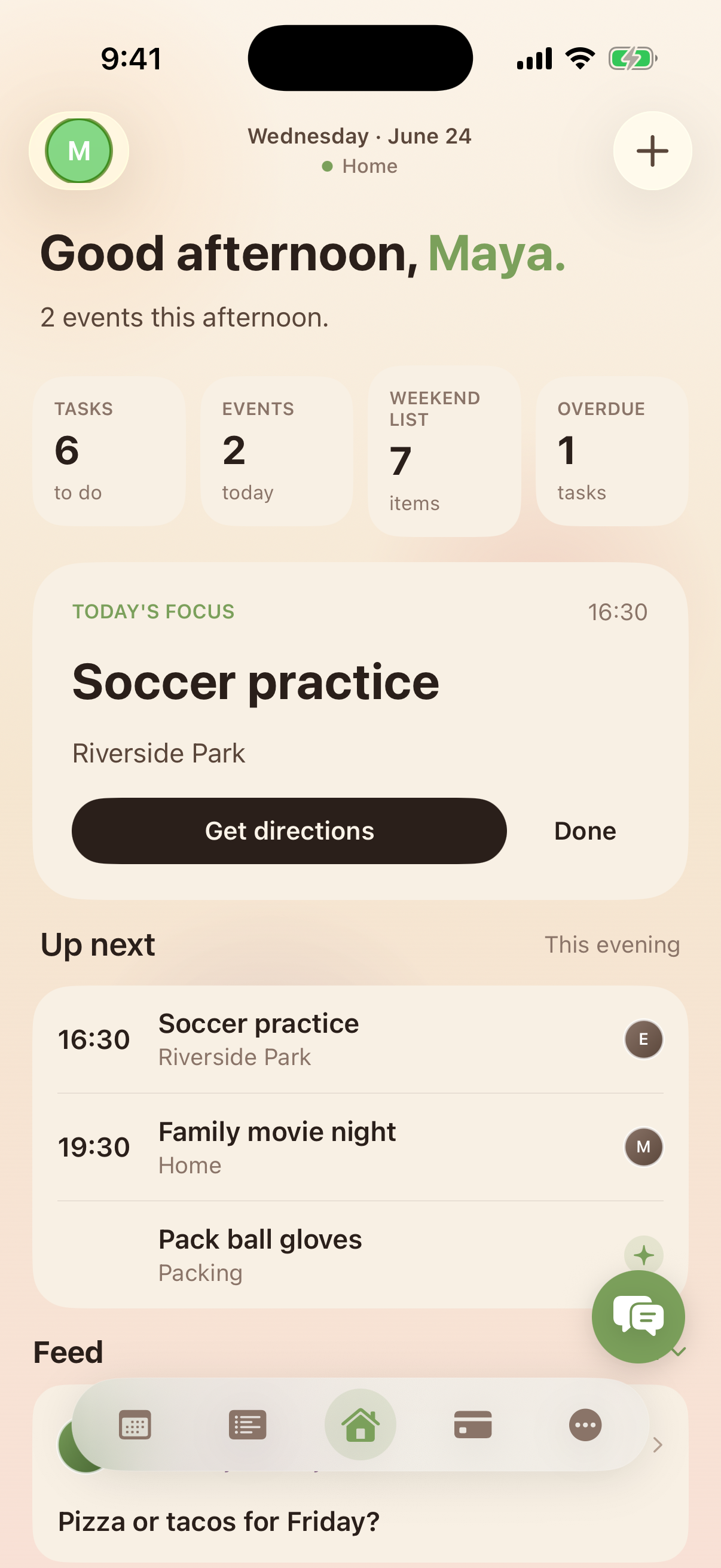
Kinrows is free for the whole household — calendar, lists, chores, and the rest of the core app, with no hardware to buy and no subscription required to use any of it. The Home screen works as the shared "first thing everyone checks" surface: a family presence row, an up-next strip with one-tap task check-off, and a shared feed, all on phones the household already owns. This is a genuine trade-off, not a strictly better option: a phone-first system asks people to check an app rather than glance at a wall, and for households that specifically want the latter, a physical display is still the right tool.
Frequently asked questions
Is there a family calendar without buying hardware?
Yes — a shared calendar app running on the phones your household already owns delivers the same core function (one calendar everyone can see and add to) without the $170-$700 hardware cost of a wall-mounted display. What you give up is the passive, always-visible screen; what you save is the upfront purchase and any recurring subscription tied to the device.
Do I need a wall display to keep the family organized?
No. The organizing function — a shared calendar, lists, and chores everyone can see — works on phones. A wall display adds passive visibility (glance without unlocking a phone), which matters most for households with young kids or a strong preference for one shared physical surface, but it isn't required to run a shared system.
What's the real ongoing cost of a hardware family calendar?
Beyond the $170-$700 hardware purchase, several wall-display products gate meaningful features — including basic to-do functionality — behind an optional annual subscription, roughly $79-$84/year in reviewer-reported cases. Confirm exactly which features require an active subscription before buying, since reviewers commonly report losing core functionality after cancelling.