
Compare
Kinrows vs Skylight
Skylight Calendar is a physical wall-mounted touchscreen (roughly $170–$630 depending on size) that syncs Google, iCloud, Outlook or Yahoo calendars and shows them on a screen the whole household can see without picking up a phone; an optional subscription of around $79 a year adds meal planning and chore rewards. Kinrows is a phone-first, hardware-free household organizer launching on iPhone in September 2026, where the app itself is the whole product rather than a companion to a screen on the wall. Choose based on whether an always-on shared display or a free phone app fits your home better.
Key takeaway: Skylight offers genuine ambient, always-visible display value at a real hardware cost; Kinrows is hardware-free, phone-first and free at its core.
What each app/device actually is
Skylight Calendar is a wall-mounted or countertop touchscreen — 10-inch, 15-inch and 27-inch “Max” models — made by Skylight, syncing Google, iCloud, Outlook and Yahoo calendars alongside chores, meal planning and family photos. Third-party reviews put hardware prices roughly between $170 and $630 depending on screen size, with an optional subscription of about $79 a year unlocking meal planning and chore rewards. A companion app manages it from a phone, separate from the display itself.
Kinrows has no hardware component: the iPhone app is the entire product. It covers a shared calendar, lists, pantry, budget, trips, family polls, chores and allowance, care coverage, notes, messages and an optional AI Concierge, all free at the core, launching September 2026.
Skylight's genuine strengths, and where it frustrates people
An always-on screen genuinely solves a problem a phone can't: everyone in the house can glance at the week without anyone unlocking a device. Third-party reviewers describe it making planning feel calmer once a household adjusts to it.
The recurring complaint is that hardware and a subscription stack on top of each other. One reviewer wrote: “Love the calendar itself but trying to manage it via the app is very frustrating. Feels like it was a complete afterthought and the website is even worse. Don't see the value of paying for an annual subscription for such an inferior implementation. Maybe once they get their act together it will be more enticing.” (an App Store reviewer, 2 stars, “Great concept, terrible app.,” App Store US, 2026-08-31). Another reviewer, having already paid for the hardware, titled a one-star review “Cash Grab” and criticized the company's use of an AI chat bot for customer service (an App Store reviewer, App Store US, 2026-09-05). A separate cluster of reviewers describes the companion app itself as glitchy — duplicate items, scheduling bugs and interface lag — even when the physical display works well.
Choose Skylight if…
- You specifically want an always-on shared screen the household can see without picking up a phone — a phone app, including Kinrows, cannot replicate that for households who want it.
- You're willing to pay $170–$630 up front for hardware and, optionally, roughly $79 a year for meal planning and chore rewards.
- You want a device-agnostic hub that syncs calendars from Google, iCloud, Outlook or Yahoo regardless of which phones the household uses.
Choose Kinrows if…
- You want the calendar, lists, budget, pantry, chores and an optional AI layer without buying separate hardware.
- You'd rather the whole product be a well-built phone app than a companion to a screen on the wall — reviewers describe Skylight's companion app as the weaker half of that pairing.
- You want the free core features paid for once, if at all, through a clearly optional Concierge subscription, rather than hardware plus a subscription stacked on top of it.
- You're an iPhone household who can wait for a September 2026 launch.
Kinrows vs Skylight at a glance
| Kinrows | Skylight | |
|---|---|---|
| Price for the whole household | Free core app; Concierge add-on $4.99–$9.99/mo; no hardware | Hardware roughly $170–$630 one-time, plus optional ~$79/yr subscription |
| Ads | — | not stated |
| Android app | — | not phone-dependent — the display works regardless of household phone OS |
| Two-way sync with your phone's calendar | Yes | yes, syncs Google/iCloud/Outlook/Yahoo calendars |
| Shared lists | Yes | yes, also shown on the wall display |
| Chores / allowance tracking | yes, fixed weekly allowance, non-punitive | chore rewards feature (subscription only) |
| Meal planning / pantry | yes, pantry-aware recipe ideas | meal planning (subscription only); no pantry tracking |
| AI assistant that takes actions | yes, Concierge (paid add-on) | — |
| Data used to train AI | — | not stated |
| Hardware required | — | yes — physical display required ($170–$630) |
| Maturity / launch status | pre-launch, opens September 2026 | established, live today |
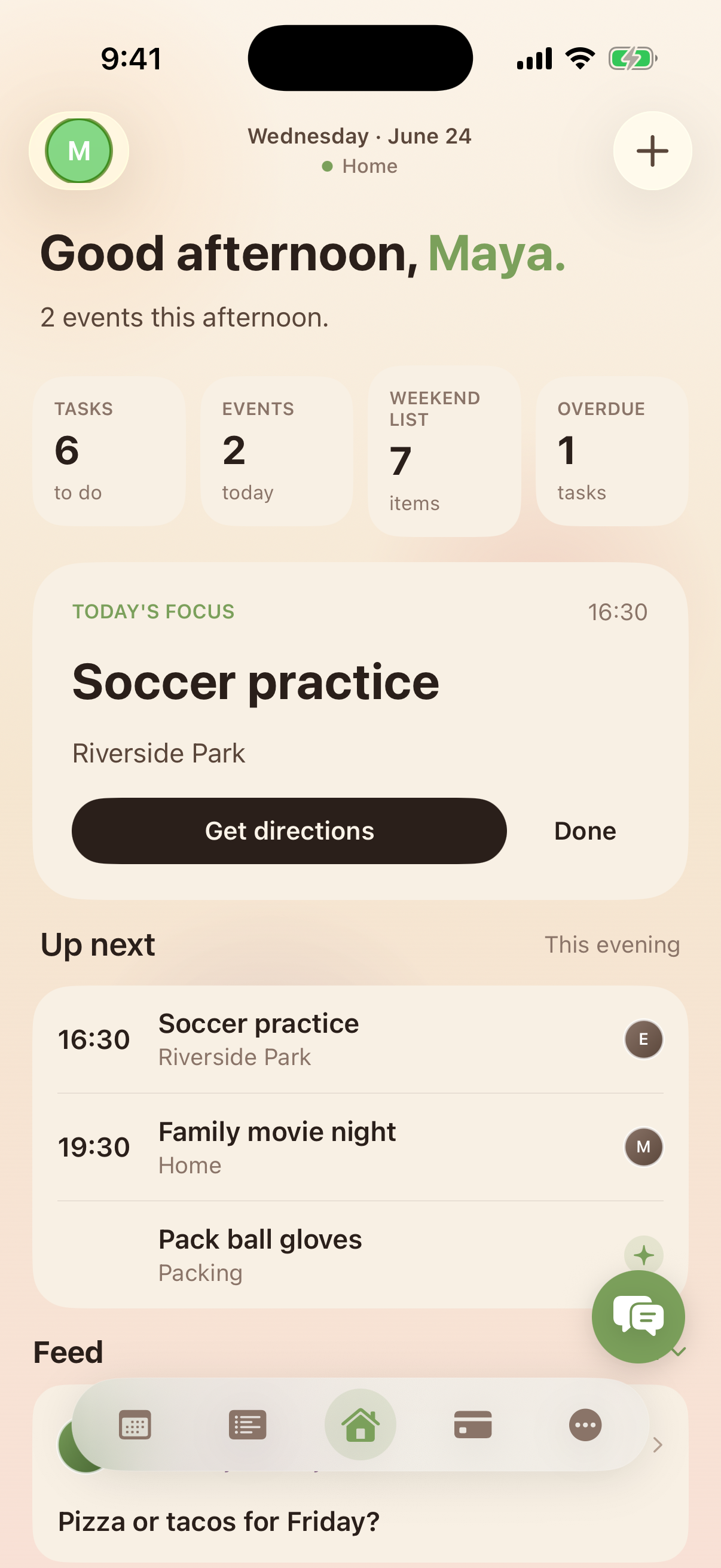
The dashboard is the whole app, not a companion to a screen
Skylight's reviewers separate the hardware they like from a companion app several describe as an afterthought. Kinrows doesn't have that split: the Home dashboard — a family presence row, an “up next” list you can tick off in one tap, and a shared feed — is the primary way a household actually uses the product, built and maintained as carefully as any other screen in the app rather than as a remote control for a device.
Frequently asked questions
Is Skylight Calendar worth the hardware cost?
That depends on how much your household values an always-visible shared screen. Third-party reviews describe it making planning feel calmer once the household adjusts, which is a genuine advantage no phone app offers. But several of Skylight's own App Store reviewers, having already paid $170–$630 for the hardware, describe the companion app and subscription as frustrating on top of that cost — worth weighing before buying.
Do I need a wall display, or does a phone app work as well?
It depends on the household. A wall display is genuinely better for a family that wants scheduling visible at a glance without anyone opening an app — that's a real, structural advantage a phone can't fully replace. A phone-first app like Kinrows works better for households who'd rather not buy hardware, want the calendar bundled with budget, pantry and chores, or want an optional AI assistant that can act on requests.
What does the Skylight subscription unlock?
Per third-party reviews, an optional subscription of roughly $79 a year unlocks meal planning and chore rewards on top of the calendar and photo functions the hardware provides without a subscription. Some reviewers who already paid for the device describe this as an unwelcome second cost on top of expensive hardware.